Log inSign up free
  • Home
  • Jobs
    • Applications
    • Career
    • Resume
    • Cover letters
    • Job X-ray
  • Studio
  • More tools
    • Profile
    • Hiring
  • Settings
All jobs
SMSmallpdf logo

Smallpdf

Location not stated

Merge PDF.

DATA & ML
Work on the go with the Smallpdf Mobile App.
Get app
Tools
  • Compress
  • Convert
  • Merge
  • Edit
  • Sign
  • AI PDF
  • Pricing
  • Teams
Log In
Free Trial
  1. Home
  2. ›
    Merge PDF

Merge PDF

Choose Files
or drop files here
Work on the go with the Smallpdf Mobile App.
Get app
Getting your file ready...
Select files

Add PDF, image, Word, Excel, and PowerPoint files

Supported formats:

  • PDF
  • DOC
  • XLS
  • PPT
  • PNG
  • JPG

Merge PDF files into a single document for free. Need to make changes to your combined PDF? Continue in any of our 40+ secure PDF tools.

  • Combine PDFs for free in seconds
  • Browser-based PDF combiner with no installation needed
  • Trusted by over 1 billion users since 2013
  • Simple Way to Combine PDFs for Free

    With Smallpdf’s PDF combiner, merging multiple PDFs into one document is quick and effortless. Simply upload your PDFs, and our tool takes care of the rest. It’s free to use, with no hidden steps and no installation needed.
  • Secure Online PDF Merging

    Your PDFs are encrypted using TLS and automatically deleted from our servers after one hour. For more details, check out our privacy policy.
  • Merge Multiple PDFs on Any Device

    Merge multiple PDFs without installing any software. Combine PDF documents seamlessly on Mac, Windows, Linux, or mobile. Prefer offline? Use our Windows app on your computer for fast and efficient merging anytime.
  • Preview and Organize with Thumbnails

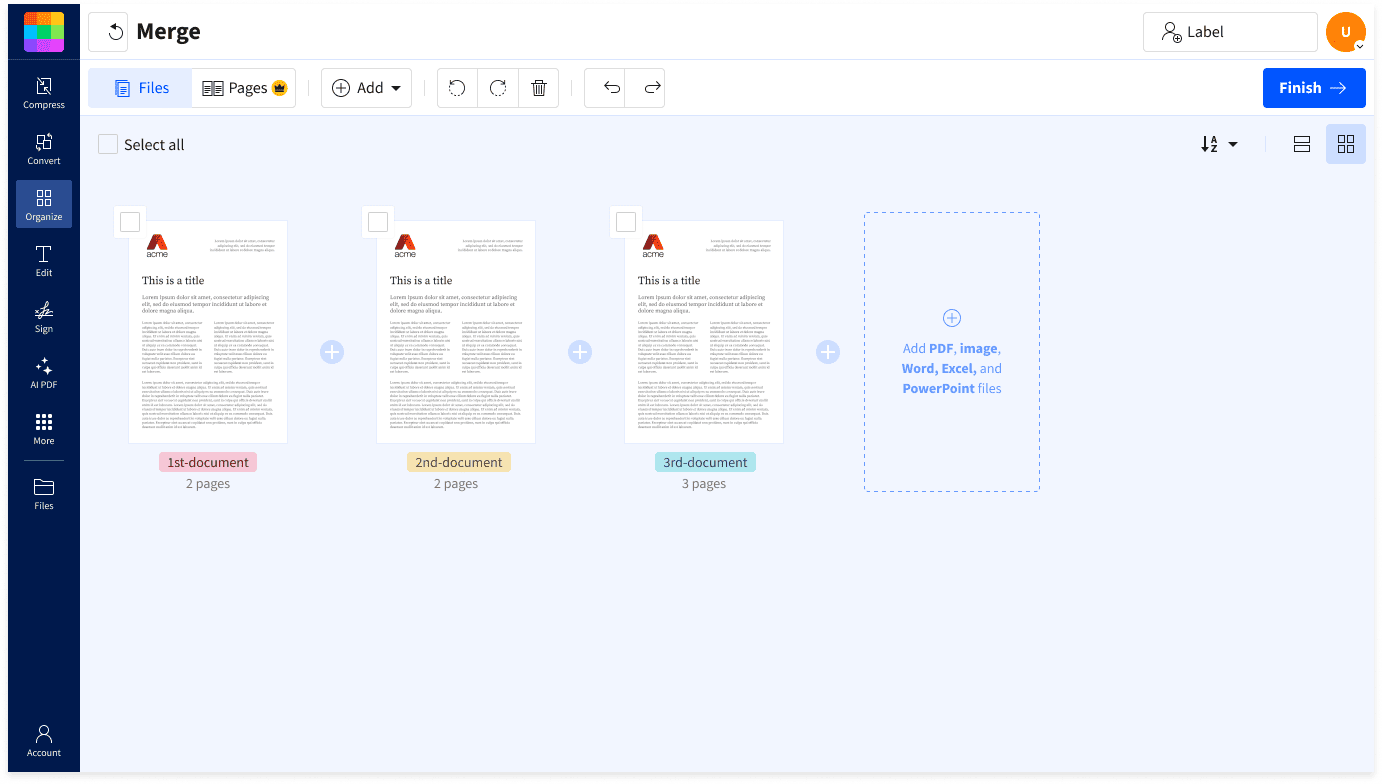
    Upload your PDFs, and we’ll show you a preview. Rearrange PDF pages into the desired order, delete what you don’t need, or add more files before merging. It’s quick, simple, and fully customizable to suit your needs.
  • Reliable PDF Merging

    Say goodbye to expensive software—Smallpdf makes merging PDFs free, simple, and secure. Your file is protected with industry-standard TLS encryption, so you can confidently merge PDFs into a single file, knowing your data stays safe and private.
  • Cloud-Based Processing

    Our online PDF merger is cloud-based, saving your device’s resources and giving you the freedom to merge PDFs from anywhere, anytime.

How to Merge PDF Files Online for Free:

  1. Drag & drop your file into our free PDF combiner.
  2. Add extra files if needed: PDFs, images, or other file types.
  3. Rearrange and rotate the pages as necessary.
  4. Hit ‘Finish’ to merge your files into a single PDF.
  5. Download, save to Google Drive, or share your merged file.
Merge PDF FAQs

  • What file formats are supported for merging?

    You can combine PDF documents with other PDFs, Word, Excel, and image files like JPG and PNG.

  • Is it possible to merge PDF and JPG files together?

    Yes! You can combine your PDFs and JPGs into a single file by uploading them to the Merge PDF tool. Just upload all your files, rearrange the pages as needed, and then merge them into a single file.

  • How can I reduce the size of a merged PDF?

    Combine your PDFs, then reduce the file size without losing quality using our Compress PDF tool.

  • What’s the best way to combine PDF files offline?

    Stay productive offline by using the Smallpdf Windows app. It allows you to securely merge, edit, and organize PDFs directly on your PC, even without an internet connection.

  • How can I merge PDF files on a Mac?

    Merge your PDFs effortlessly on any Mac browser with Smallpdf's online tool. Simply upload your files, arrange them as needed, and merge them into a single document—no software installation necessary.

  • Is it possible to combine PDF files directly in Google Drive?

    Although Google Drive lacks a built-in merge function, you can use Smallpdf's Merge PDF tool to combine your PDFs for free and then save them directly to your Google Drive.

  • Can I combine non-PDF files?

    Yes. With Smallpdf, merging documents in any format is just as easy as merging PDFs. Simply upload your Word, PowerPoint, Excel, or image files. Smallpdf will convert them for you, and then you can merge them.

Merge PDF Blog Articles

How to Combine PDF Files in PDF24
How To Merge PDF
How to Combine PDF Files in PDF24
PDF24 offers a quick way to combine multiple PDFs into one file. Below, you’ll find step-by-step instructions for the browser-based PDF24 tools.
How to Combine Signed PDF Files
How To Merge PDF
How to Combine Signed PDF Files
Need to combine signed PDF files into one document? You can use Merge PDF to put files together, but first you need to know what kind of signature each PDF contains.
Trust Is the New Bottleneck at Work: Most Professionals Doubt the Files They Receive
How To Merge PDF
Trust Is the New Bottleneck at Work: Most Professionals Doubt the Files They Receive
New research reveals how fabricated and edited files make “proof” a bottleneck, forcing teams to spend more time verifying than doing.
How To Combine PDF Files on a Mac
How To Merge PDF
How To Combine PDF Files on a Mac
Learn three simple ways to merge PDF files on your Mac using Preview, Finder, or Smallpdf—plus tips for organizing and securing your documents.
How To Mail Merge a PDF in 2026
How To Merge PDF
How To Mail Merge a PDF in 2026
Create a mail merge in Word, then mail merge a PDF for polished, personalized documents. Send, sign, and store them securely.
How to Merge PDF Files with Adobe Reader
How To Merge PDF
How to Merge PDF Files with Adobe Reader
You can merge PDF files using Adobe Acrobat Pro or free online tools like Smallpdf. This guide walks you through how to do it with Adobe. We also show you how to combine files quickly in your browser for free—without installing software.
Show more articles
Rate this tool
4.8 / 5 - 737,602 votes
Compress
  • Compress PDF
Convert
  • PDF Converter
  • PDF OCR
  • PDF to PDF/A
PDF to Image
  • PDF to JPG
  • PDF to PNG
Image to PDF
  • JPG to PDF
PDF to Office
  • PDF to Word
  • PDF to Excel
  • PDF to PPT
Office to PDF
  • Word to PDF
  • Excel to PDF
  • PPT to PDF
OpenOffice to PDF
  • ODT to PDF
  • ODS to PDF
  • ODP to PDF
Convert to PDF
  • TXT to PDF
  • RTF to PDF
  • HWP to PDF
  • HTML to PDF
  • EPUB to PDF
  • ZIP to PDF
  • CSV to PDF
iWork to PDF
  • Pages to PDF
Organize
  • Merge PDF
  • Split PDF
  • Rotate PDF
  • Delete PDF Pages
  • Extract PDF Pages
  • Organize PDF
Edit
  • Edit PDF
  • PDF Annotator
  • PDF Reader
  • Number Pages
  • Crop PDF
  • Redact PDF
  • Watermark PDF
  • PDF Form Filler
  • Share PDF
Fill & Sign
  • Sign PDF
  • Request Signatures (Sign.com)
Protect
  • Unlock PDF
  • Protect PDF
  • Flatten PDF
AI PDF
  • AI PDF Assistant
  • Chat with PDF
  • AI PDF Summarizer
  • Translate PDF
  • AI Question Generator
Scan
  • PDF Scanner
We make PDF easy.
  • Solutions

  • Sales
  • Finance
  • Real Estate
  • Education
  • Company

  • About
  • Help
  • Blog
  • Careers
  • PDF Statistics
  • Product

  • Pricing
  • Teams
  • Embed PDF
  • Developers
  • Sign.com
  • Compare
  • Accessible PDF
  • Apps

  • Download Smallpdf
  • PDF Scanner
  • Windows App
Download for Windows
Get it on Google Play
Download on the App Store
© 2026 Smallpdf AG — Made with
for the people of the internet.
Privacy Notice
Terms & Conditions
Imprint
Contact Us
English
Select Language
  • Bahasa Indonesia
  • Bahasa Malaysia
  • Dansk
  • Deutsch
  • English
  • Español
  • Français
  • Italiano
  • Nederlands
  • Norsk (bokmål)
  • Polski
  • Português
  • Svenska
  • Tiếng Việt
  • Türkçe
  • Русский
  • Українська
  • العربية
  • हिन्दी
  • ภาษาไทย
  • 한국어
  • 日本語
  • 简体中文
  • 繁體中文
Pay
Not stated
Where
Not stated
Work
Not stated
Type
Not stated
Posted
13 Oct, 2026
Visa
Sponsorship unknown
Apply on the original postingSign in to apply

Unverified board

Seen open on its job board in the last 3 days.

Open since at least 13 Oct, 2026.

Visa sponsorship

Unknown: ask at the first call

Why, and where it comes fromHide the evidence

Foly found no public US visa filings for this employer. That isn't a no: the posting doesn't say either way.

  • Source: US Department of Labor, LCA disclosure data
  • No records imported yet.

At the first recruiter call, ask: “Does this role support visa sponsorship, now or in the future?” before more rounds.

Public data, not legal advice. For your own situation, ask your school's international office or an immigration attorney.

more at Smallpdf.

13 Oct, 2026

Smallpdf

AI PDF Assistant

SMSmallpdf logo
  • Data & ML
Seen open on its job board in the last 3 days

Location not stated

Salary not listed

Details
13 Oct, 2026

Smallpdf

eSign PDF for Free

SMSmallpdf logo
  • Data & ML
Seen open on its job board in the last 3 days

Location not stated

Salary not listed

Details
13 Oct, 2026

Smallpdf

Free Online PDF Editor

SMSmallpdf logo
  • Data & ML
Seen open on its job board in the last 3 days

Location not stated

Salary not listed

Details